Thursday, 7 May 2009

Gesture Recognition - Pritpal Sarlech

Introduction

Gesture Recognition interprets human gestures by using mathematical algorithms. The face or hand is the most common bodily motions used in Gesture Recognition. One of the main focuses nowadays is emotion recognition by recognising the different gestures from the hand and face. There have also been attempts in understanding sign language by the use of cameras and computer vision.

Using Gesture Recognition computers are able to understand the human body language, therefore making the relationship computers and humans already have stronger. Gesture Recognition allows humans to interface with machines (HMI) and interact without any mechanical devices. Gesture Recognition allows the user to point their finger at a monitor on a PC, and by doing this the mouse pointer will move to where it’s supposed to go, because of this it could make PC input devices no longer required.

Uses of Gesture Recognition

Gesture Recognition is good for processing data from humans which is not input as speech or on a keyboard. Computers can identify many different types of gestures such as:

- Sign language recognition – Just as speech recognition can convert speech to text, different types of Gesture Recognition software can convert the symbols represented through sign language into text.

- For Socially Assistive Robotics – By using sensors such as Accelerometers and Gyros worn on the user and then reading the results given by the sensors, the robots are then able to assist in patient treatment, for example stroke rehabilitation.

- Directional indication through pointing – Using Gesture Recognition to show where a person is pointing is useful for identifying the instructions given.

- Control through facial gestures – Controlling a computer by using facial gestures is very useful for people who may not be able to physically be able to move a keyboard or mouse, for example Eye tracking is an excellent example of how the user would be able to control the cursor by focusing on different parts of the monitor.

- Alternative computer interfaces – Prior to the keyboard and mouse setup to interact with the computer, strong Gesture Recognition would allow the user to complete tasks by using hand or face gestures to a camera.

- Immersive game technology – The Nintendo Wii is a prime example of immersive game technology, the remote makes the game player’s experience more interactive.

- Virtual controllers – For systems where finding a physical controller could take up too much time, gestures can be used as another way to control, for example, a devices in a car or a television.

- Remote control – Thanks to Gesture Recognition, controlling a remote control with the wave of a hand is now possible. The signal must give the desired response. Playstation’s sixaxis controllers and the Nintendo Wii’s Remote are a good example of this.

Gesture Recognition Challenges

Gesture Recognition has many challenges associated with the accuracy and usefulness of Gesture Recognition software. With image-based Gesture Recognition there are limits as to the equipment used and image noise. The lighting used in images or video may not be very consistent, or in the same location. Objects in the background, or anything that stands out may make it more difficult for recognition.

In order to capture human gestures by the use of visual sensors, computer vision methods are also required, such as with hand tracking and hand posture recognition and also for capturing movements of the head and facial expressions.

Below are a couple of examples of gesture recognition:

http://www.youtube.com/watch?v=F8GVeV0dYLM

This video shows that Gesture Recognition is used to sense the users hand and detect how many fingers are being displayed, when the sensors pick up the users hand it then shows how many it thinks are being shown, and as you can see it is very accurate apart from when the user makes sudden movements or changes to how many fingers are being displayed.

http://www.youtube.com/watch?v=D2BcRblGVVM

This video shows Gesture Recognition software that speeds up/slows down/changes direction depending on which way the user is pointing their hand.

Below is an image of a Nintendo Wii Remote:

http://www.progex.at/progex/index.php/studies/4-flying-jj/33-the-wii-controller

Below is an image of a sixaxis Playstation 3 controller:

http://news.cnet.com/8301-17938_105-9781566-1.html

References

YouTube (2008) Simple Hand Gesture Recognition [online] available from [5th May 2009]

YouTube (2007) Gesture recognition [online] available from [6th May 2009]

::work in...projex:: (no date) the wii controller [online] available from [5th May 2009]

cnet news (2007) PS3 controller is ready to rumble [online] available from [5th May 2009]

Wednesday, 6 May 2009

Speech Recognition - By Balroop Bhogal

What it is

Speech recognition (also known as automatic speech recognition or computer speech recognition) converts spoken words to be machine readable. Speech recognition applications include voice dialling e.g. “Call home”, call routing e.g. "I would like to make a collect call", domestic appliance control and content-based spoken audio search, simple data entry e.g., entering a credit card number, preparation of structured documents speech-to-text processing e.g. word processors or emails, and in aircraft cockpits. The performance of speech recognition systems is usually specified in terms of accuracy and speed. Dictation machines can be used to achieve very high performance in controlled conditions. Commercially available speaker-dependent dictation systems usually require only a short period of training and may successfully capture continuous speech with a large vocabulary at normal pace with a very high accuracy. Most commercial companies claim that recognition software can achieve between 98% to 99% accuracy if operated under optimal conditions. Optimal conditions usually assume that users:


  • have speech characteristics which match the training data,


  • can achieve proper speaker adaptation, and


  • Work in a clean noise environment (e.g. quiet office or laboratory space).

This explains why users with accents might have lower recognition rates. Speech recognition in video has become a popular search technology used by several video search companies. Limited vocabulary systems, requiring no training, can recognize a small number of words as spoken by most speakers. Such systems are popular for routing incoming phone calls to their destinations in large organisations. Both acoustic modelling and language modelling are important parts of modern statistically based speech recognition algorithms. Hidden Markov models (HMMs) are widely used in many systems. Language modeling has many other applications such as smart keyboard and document classification


How it works


To understand how speech recognition works it is desirable to have knowledge of speech and what features of it is used in the recognition process. In a human brain, thoughts are constructed into sentences and the nerves control the shape of the vocal tract which includes the jaws, tongue, mouth, vocal cords etc, to produce the desired sound. The sound comes out in phonemes which are the building blocks of speech. Each phoneme resonates at a fundamental frequency and harmonics of it and thus have high energy at those frequencies. The first three harmonics have significantly high energy levels and are known as formant frequencies. Each phoneme have a unique fundamental frequency and hence unique formant frequencies and it is this feature that enables the identification of each phoneme at the recognition stage. In general , speech recognition systems have stored reference templates of phonemes or words with which input speech is compared and the closest word or phoneme is given out. Since it is the frequencies that are to be compared , the spectra of the input and reference template are compared rather than the actual waveform.

Speech is preferred as an input because it does not require training and it is much faster than any other input. Also information can be input while the person in engaged in other activities and information can be fed via telephone or microphone which are relatively cheaper compared to current input systems. But there are several disadvantages in the recognition process. The same difficulty occurs when words are stored in reference template in continuous speech recognition. As already mentioned, in speaker-independent systems only isolated word recognition is commercially available. Most buyers would like the system to be speaker independent, and uttering words in isolation can be quiet irritating especially when the input is bulk and the processing speed may not be very fast. Even in speaker-dependent connected word recognition system (limited vocabulary) the speed of input is only up to 50 words per minute which is not very fast.


Other Disadvantages include;

  • TIME; Typing is much faster than voice recognition.

  • MONEY; In addition to the cost of the software and the microphone, there has been very little success using voice recognition on a machine with less than 512 MB of RAM.

  • ACCURACY. This is related to the time issue--part of what makes voice recognition slower than typing is the need to correct misrecognition errors. In addition, any errors that are not caught by the author will not be caught by a spell checker since they will consist of the wrong word, spelled correctly


Design Issues


Abstracted view of reality - separate processing for speech - we hear what we expect to hear background noise, directional or broadcast modality
Human speech recognition tolerates mispronunciations, non-grammatical sentences, dialects
Sound/speech discrimination varies with age, depends on frequency (pitch), amplitude (loudness) and contrast (foreground/background - dB ratio) The future As with any automation systems, Automatic Speech Recognition (ASR) systems will be employed when their speed and efficiency is higher than the current input method so that savings can be made. But as mentioned above ASR systems have not quite reached that competitive position. On the other hand ASR systems are now more affordable than ever before. And when speaker-independent continuous speech recognition systems are developed speech recognition will be one of the popular methods of data input and will lead to the development of vocally interactive computers.


Conclusions


Initially looking at Speech recognition, it seemed simple and straight forward. It has become apparent that it would be a very difficult task to accomplish, and would require much more time, effort, and background on the subject than first thought.


http://video.google.co.uk/videoplay?docid=8823126335312817761&ei=By8ESq_qFcvT-QbIvdT6AQ&q=speech+recognition&hl=en

Being able to determine what is spoken or who a speaker is with near perfect accuracy is an extremely difficult task. Preventing another individual from breaking into the system can be just as difficult, as it requires a system dependent on text and a system that will not accept anything other than what it specifies. The initial idea of being able to determine what word was being spoken is, at best, naïve, and at worst not at all feasible.


Links
http://www.youtube.com/watch?v=kX8oYoYy2Gc&feature=related


http://www3.edc.org/spk2wrt/hypermail/5371.html

http://en.wikipedia.org/wiki/Speech_recognition

3D Interaction (Virtual Reality / Augmented reality) posted by Saagar Parmar


A clear and concise description and explanation of your chosen technologyThere are many different aspects of Virtual Reality, such as ‘Immersive VR’, ‘Desktop VR’, ‘Command and control’ and ‘Augmented Reality’. I will briefly explain the differences between the various aspects of Virtual Reality below. (Dix, Finlay, Abowd and Beale 2004)Immerse VRImmerse VR allows the user to be fully “immersed” into the virtual world. This could mean they are using such equipment like ‘VR Goggles’, ‘VR Helmet’, ‘VR full body kit’ and a ‘VR Dataglove’. (Dix, Finlay, Abowd and Beale 2004) Being fully immersed into the virtual world allows the user to be completely inside this world whereby they can interact with the objects around them.Desktop VR
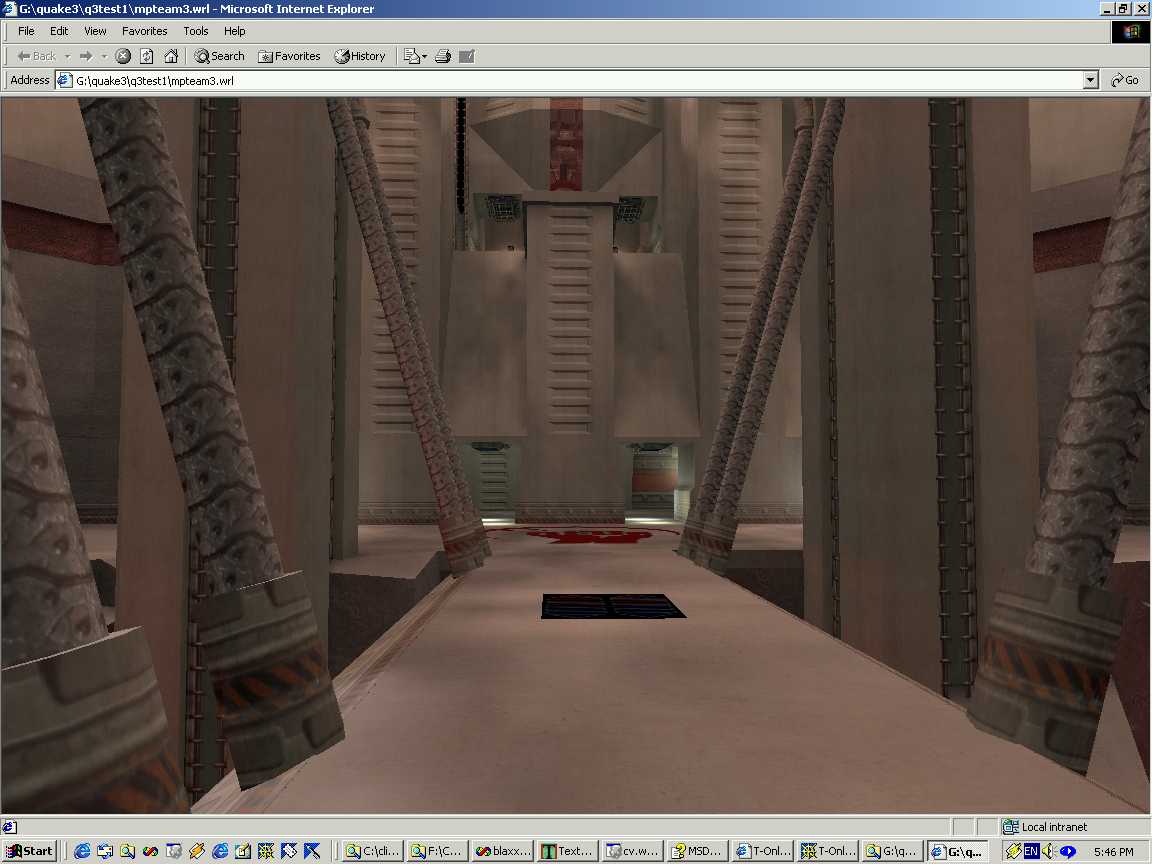
Desktop VR allows the user to interact with 3D objects using the mouse and the keyboard. Examples of where this has been used is in ‘football’ games and other games like “Flight Simulator”, “DOOM” and “Quake 3” too, however with Quake 3 the default maps can be transformed using ‘VRML’ which stands for Virtual Reality Markup Language. Figure 1 illustrates the transformed Quake 3 map in VRML and Figures 2 and 3 illustrate the use of VRML in a football game. VRML allows virtual worlds to be spread across the Internet which can be integrated with other virtual worlds. The user can have the option of navigating through these worlds and interacting with the objects in front of them using both the keyboard and the mouse. Furthermore the use of these interactions can also take the user from one virtual world to another. (Dix, Finlay, Abowd and Beale 2004)

Figure 1 - Quake 3 VRML (Grahn)


Figure 2 - Football Game VRML (Virtual Reality Laboratory 2004)


Figure 3 - Football Game VRML (Virtual Reality Laboratory 2004)


Command and Control VR
Command and Control VR allows the user to be put in a virtual world but be surrounded by real physical surroundings. For e.g. the use of flight simulators. The user is in a pretend cockpit where the windows are replaced with large screens that have the terrain projected to them in which case the cockpit moves around to simulate being in a real flight simulation. (Dix, Finlay, Abowd and Beale 2004)
Augmented RealityAugmented Reality is where both VR and the real world meet. Virtual images are projected over the user as an overlay whereby the user can interact with the objects in front of them. (Dix, Finlay, Abowd and Beale 2004) The use of similar technology has been used in ‘X-Men: The Last Stand’ in the war simulation at the beginning of the film.The disadvantage of Augmented Reality is that both the overlay of the virtual world and the physical objects must be exactly aligned otherwise problems could occur whereby the interaction of objects could be miscalculated and would most definite confuse the user but also could be fatal depending on the interaction carried out. The advantage of such technology is that with the use of the user’s gaze and position it is detected by the virtual world in which case the environment is safe. (Dix, Finlay, Abowd and Beale 2004)
An insight into how your chosen technology ‘breaks’ the paradigm of desktop computing
In relation to the other aspects of VR I have decided to choose the use of Desktop VR in particular the use of VRML. One example I have found which is supported with evidence is the use of surgery. Operations can be carried out by surgeons in a virtual world. The use of carrying out surgery in such a way is to perfect the technique in carrying out a certain procedure. The patient’s body is scanned and the data is passed and transformed into the virtual world. What’s more is that the use of haptic feedback is incorporated in this simulation whereby the surgeon can feel the texture and the resistance whilst the incision is being made in the “virtual body”. See Figures 4 – 6 for examples of where this has been used. (Dix, Finlay, Abowd and Beale 2004)


Figure 4 - Surgery VRML (State and Ilie 2004)

Figure 5 - Surgery VRML (State and Ilie 2004)

Figure 6 - Surgery VRML (State and Ilie 2004)

An analysis of the usability and HCI problems still to be overcome before your chosen technology becomes widely adopted in the marketImmerse VR can be costly as it requires a lot of processing power and thus it is still not ready for mass market. (Dix, Finlay, Abowd and Beale 2004) Furthermore it could be uncomfortable to wear the gear that comes with immersive VR. (Prashanth)Furthermore, the user in the virtual world could also suffer from ‘motion sickness’ if there is latency in the system relaying the images to the user, whereby the user will become disorientated from the dizziness. (Dix, Finlay, Abowd and Beale 2004)With augmented VR the registration of the overlay and the physical objects need to be exact as disussed above as it could be disastrous if these images are not correctly aligned. (Dix, Finlay, Abowd and Beale 2004)

References

Websites

Grahn, H. N/A [online] available from <http://home.snafu.de/hg/vrml/q3bsp/q3mpteam3_shot.jpg> [25 April 2008]– Uses VRML

Prashanth, B.R. AN INTRODUCTION TO VIRTUAL REALITY IN SURGERY [online] available from<http://www.edu.rcsed.ac.uk/lectures/Lt12.htm#Applications> [25 April 2008]State, A. and Ilie, A. (2004)

3D+Time Reconstructions [online] available from <http://www.cs.unc.edu/Research/stc/Projects/ebooks/reconstructions/indext.html> [25 April 2008]– Uses VRML

Virtual Reality Laboratory (2004) The Virtual Football Trainer [online] available from<http://www-vrl.umich.edu/project/football/> [25 April 2008]– Uses VRML

Books

Dix, A. , Finlay, J. , Abowd, G. and Beale, R. (2004) HUMAN-COMPUTER INTERACTION. 3rd ed. Essex:Pearson Education Limited

Online Papers For VR

Brewster, S. and Pengelly, H. Visual Impairment, Virtual Reality and Visualisation [online] available from <http://www.dcs.gla.ac.uk/~stephen/visualisation/>[25 April 2008]– VR for blind people

Villanueva, R., Moore, A. and Wong, W. (2004) Usability evaluation of non-immersive, desktop, photo-realistic virtual environments [online] available from <http://eprints.otago.ac.nz/152/01/28_Villanueva.pdf> [25 April 2008]

Weaver, A., Kizakevich, P., Stoy, W., Magee, H., Ott, W. and Wilson, K. Usability Analysis of VR Simulation Software [online] available from <http://www.rti.org/pubs/Usability.PDF> [25 April 2008]

Tuesday, 5 May 2009

Eye Tracking (5) - By Kalpesh Chavda

References


EYE TRACKING

http://thethinkingmother.blogspot.com/2008/09/eye-tracking-problem-links.html

http://en.wikipedia.org/wiki/Eye_tracking

http://psychology.exeter.ac.uk/images/eyetracker.jpg

http://thinkeyetracking.com/eyetracking-20/

http://www.a-s-l.com/Site/

http://www.a-s-l.com/site/Products/EYETRAC6Series/DesktopRemote/D6RemoteTracking/tabid/66/Default.aspx

Sunday, 3 May 2009

Eye Tracking (4) - By Kalpesh Chavda

Leading developers in Eye Tracking Technology


ASL has been a pioneer in the examination of human eye movement and pupil dynamics for over 30 years. Founded by M.I.T. scientists in 1962, ASL developed the first video based eye tracker in 1974.

ASL is the first company to develop head mounted optics, eye/head integration, parallax free optics, magnetic head tracking, assisted remote optics and many features that are now industry standard. Our innovative spirit continues to flourish. ASL offers the broadest and most comprehensive line of video based eye trackers.

ASL is the leader in the design, development, manufacturing and distribution of eye tracking equipment worldwide by providing specialty design and development services for the research and consumer marketplace.
The product range of ASL is continually being developed to incorporate new technology with the noteworthy goal of advancing the understanding of eye movement and dynamics. ASL has designed smaller, less expensive and more flexible devices to assist researchers operating under stringent budget guidelines.

The ASL range of systems represents the most complete line of eye measurement and recording available today. ASL eye tracking applications are far reaching and include:


• Usability

• WEB Design

• In-Vehicle Research

• Human Factors

• Sports Training

• Medical Research


http://www.a-s-l.com/site/Company/Overview/tabid/115/Default.aspx


http://www.youtube.com/watch?v=tFdOSODLrDs


http://www.youtube.com/watch?v=fFbT7bAVI8w

Eye Tracking (3) - By Kalpesh Chavda

The problems Eye Tracking is Suffering

Firstly the eye tracking equipment and software is very expensive, some of the most complex and advanced products can easily go into four figures which the average person may find too expensive.

Not everyone can work with eye tracking software, every person is different and no type of eye is the exact same, issues in the past have been different shape eyes, contact lenses, and even to certain extent eye lashes have been seen as a problem. People with poor vision and elderly people have shown very bad results when it comes to using the software.

The whole process of setting up the eye tracker on a person and the calibrating it can be a very lengthy process, people can become disinterested, and when you compare this to the set up of a mouse it seems like a lifetime.

Eye movements as accurate as they may seem not always produce the results we wish to hope for. Random eye movements may occur resulting in unexpected results. Eye movement are natural to us (subconscious) and compared to a mouse it can be very difficult to precisely gaze the eye on a point.

If these issues can be ironed out then it could widely be adopted in the market.

Eye Tracking (2) - By Kalpesh Chavda

How does Eye Tracking Break the Paradigm of Desktop Computing?

Leading developers in the world associated with Eye Tracking technology have been working hard to try and make eye tracking a reliable and competitive technology along with other technologies such as motion and touch. ASL (Applied Science Laboratories) have been working hard at applying this technology to standard everyday desktop use.

They have developed a device called the D6 Remote Tracking. The device is based on a humans gaze and works with people of all ages. The ‘gaze’ is picked up on a computer screen and can show the movement of a persons eye based on the stimulus of the eye.


http://www.youtube.com/watch?v=ticWZ0ad8sc&feature=PlayList&p=B5546130824D9F07&index=35

ASL have envisaged an idea that eventually the eye tracking software can be a competitive option to normal computing technologies such as the mouse. Their idea is to basically substitute the mouse for the eye tracking system. This would help with disabilities and could help the ease of computing.


Current Technologies within Eye Tracking

Eye tracking is currently being used in a wide variety of fields such as

  • Cognitive Studies
  • Medical Research
  • Human Factors
  • Computer Usability
  • Translation Process Research
  • Vehicle Simulators
  • In-vehicle Research
  • Training Simulators
  • Virtual Reality
  • Adult Research
  • Infant Research
  • Adolescent Research
  • Geriatric Research
  • Primate Research
  • Sports Training
  • fMRI / MEG / EEG
  • Commercial eye tracking (web usability, advertising, marketing, automotive, etc)
  • Finding good clues
  • Communication systems for disabled
  • Improved image and video communications


Eye Tracking Vs Eye Gaze

Eye trackers necessarily measure the rotation of the eye with respect to the measuring system. If the measuring system is head mounted, as with EOG, then eye-in-head angles are measured. If the measuring system is table mounted, as with scleral search coils or table mounted camera (“remote”) systems, then gaze angles are measured.

In many applications, the head position is fixed using a bite bar, a forehead support or something similar, so that eye position and gaze are the same. In other cases, the head is free to move, and head movements are measured with systems such as magnetic or video based head trackers.

For head-mounted trackers, head position and direction are added to eye-in-head direction to determine gaze direction. For table-mounted systems, such as search coils, head direction is subtracted from gaze direction to determine eye-in-head position.